
Alfred App is a great application for quickly finding and launching things on your Mac. It’s similar to LaunchBar, Quicksilver and Google’s Quick Search Box (plus many more similar apps).
What I love about Alfred is that is quick, very quick in fact, and simply to use. I don’t really need all the extras that Lunchbar or Quicksilver offers, although they are handy — I just want to be able to quickly find stuff on Mac, launch Applications and lookup contacts — job done!
Alfred is free, but there is a paid add-on called Powerpack, and since version 0.8.1, Powerpack users could create their own colour themes. Now with version 0.8.2, you can export/import themes meaning you can now share them with friends.
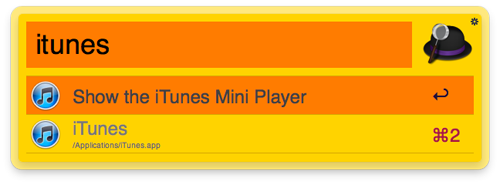
Although I like the default Dark theme, I have a thing for Orange, so created a bright orange theme and called it Tangerine, and messing around with the theme editor this morning, I quickly created a Black theme (Dark, but much darker!).
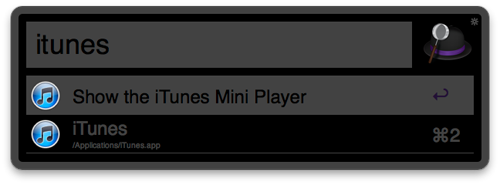
You can download both themes here, and if you are a Powerpack user, just double click on the downloaded files to automatically open/import in Alfred.
Downloads have been disabled.
Don’t have Alfred? Visit www.alfredapp.com and grab the latest version.
how do i add the theme to alfred?